
Rules-based workflow
Best when each trigger, rule, approval, and exception can be defined. Examples include CRM updates, invoice reminders, status notifications, and scheduled reports.
Business process automation software and workflow automation services that connect CRM updates, Xero handoffs, approvals, reporting, and admin tasks so teams spend less time copying data.
Bring one repetitive process. We’ll map the first sensible step.
Fixed price, agreed before work starts — no hourly rates.
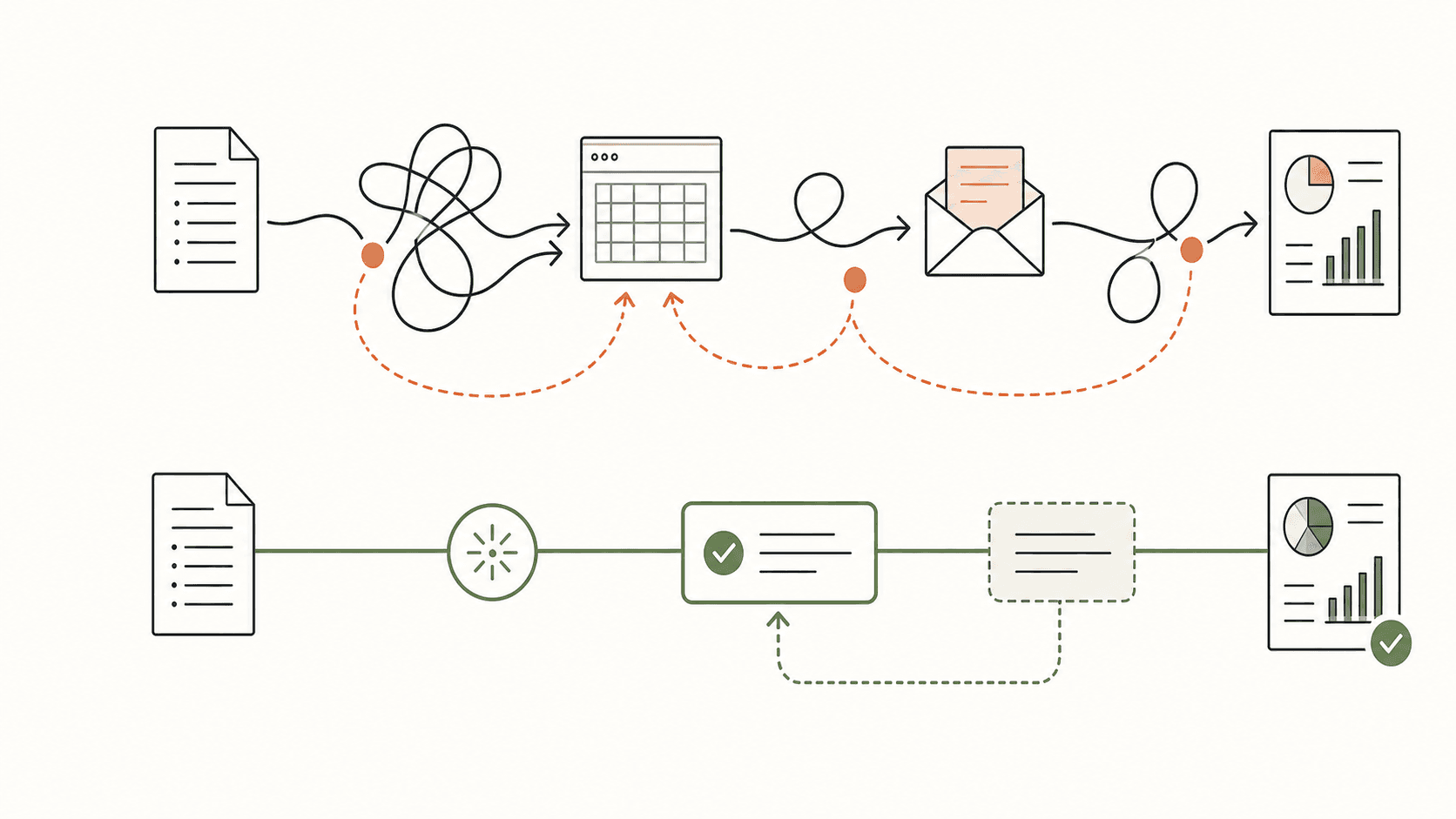
Workflow automation
Tool integrations (Xero, Google, Slack, etc.)
Custom dashboards
Reduce manual data entry
Business owner who spends hours on repetitive admin tasks
If your team is manually copying data between tools, sending the same emails over and over, or spending hours on tasks that should take minutes — automation can fix that. We connect the tools you already use, eliminate manual data entry, and build custom dashboards so you can see what's happening without digging through spreadsheets. The result is hours back in your team's week and fewer mistakes from manual processes.
If the repeated work involves admin, reporting, research, CRM updates, QA, or approval-safe handoffs, see how Jarve builds AI workflow automation for these higher-leverage workflows.
When the automated process needs its own portal, dashboard, integration layer, or approval rules, Jarve also builds custom business software around those workflows.
Business process automation software should start with the work that is already costing the team time: copying CRM updates, reconciling Xero handoffs, chasing approvals, building weekly reports, or moving the same customer details through several tools.
Jarve scopes workflow automation services around those repeatable handoffs first, then adds the dashboards, notifications, integrations, and approval rules needed to make the process reliable for an Australian operations team.
Start with AI workflow automation, remove the repeated steps with manual process automation, or turn the workflow into custom business software when the automation needs a portal, dashboard, or integration layer.
Best when each trigger, rule, approval, and exception can be defined. Examples include CRM updates, invoice reminders, status notifications, and scheduled reports.
Best when the process includes unstructured email, documents, research, summaries, or draft decisions that still need a person to review them.
Best when several roles need a shared portal, dashboard, audit history, permissions, and integrations around the automated process.
The Fleur Studios automation case study shows a delivered stock and preorder workflow with dry-run review, activity history, alerts, reconciliation jobs, webhook processing, and integration health checks. Private order and customer data remains protected.
We start with the smallest useful workflow, then give you a clear scope and price. Integrations, exception paths, approvals, and data quality determine the right first step.
Proof, not promises
Real delivered projects, described within each client's privacy limits — no invented numbers, no stock testimonials.
Named protected work
A flat-glass CRM workflow from lead to job
Read the case studyProtected operations work
Retail stock and preorder automation without exposing orders
Read the case studyAnonymised example
Replacing spreadsheets and disconnected apps
Read the case studyNot every step should be automated. I’ll help separate the useful automation from the parts that still need human judgement.
Directly with James. No sales presentation. No obligation.
We identify which manual tasks are costing the most time, which are error-prone, and which can be automated with the highest ROI.
Map out the automated workflows: triggers, actions, error handling, and notifications. You approve the logic before we build.
Wire up integrations, build custom automations, and create dashboards. Everything is tested with real data before going live.
Automations go live with monitoring and alerts. We verify everything runs correctly for the first two weeks.
Business automation services connect repeated admin, CRM updates, Xero handoffs, reporting, approvals, and notifications so the same work is not copied between tools. Jarve maps the workflow first, then builds the integrations, dashboards, or custom software needed to make workflow automation services reliable.
Any tool with an API — which covers most modern business software. Common ones: Xero, Google Workspace, Slack, Stripe, Mailchimp, HubSpot, and many more. We can also work with legacy systems that have database access.
Zapier is great for simple connections between two tools. We build automations for workflows that are too complex for Zapier — multi-step processes, custom logic, error handling, and scenarios where you need a custom UI or dashboard on top.
Start with the tasks that take the most time and are the most repetitive. In our audit phase, we'll identify the highest-ROI automations and recommend a priority order. Most clients see the biggest wins from eliminating manual data entry and automating notifications.
If you're deciding whether business automation is the right fit, these solution pages and tool comparisons show the kinds of problems it solves best.
Start with one repeated process. We’ll identify the avoidable handling, necessary review points and a practical next move.
Direct access to the person doing the work
Fixed scope before development
Documentation and handover included
You'll get a recommended next step and likely range—even if Jarve isn't the right fit.